Last updated on September 4th, 2015 at 08:34 pm
How To Auto-Delete Temporary Files abandoned by Mozilla apps on your Mac OS X Desktop.
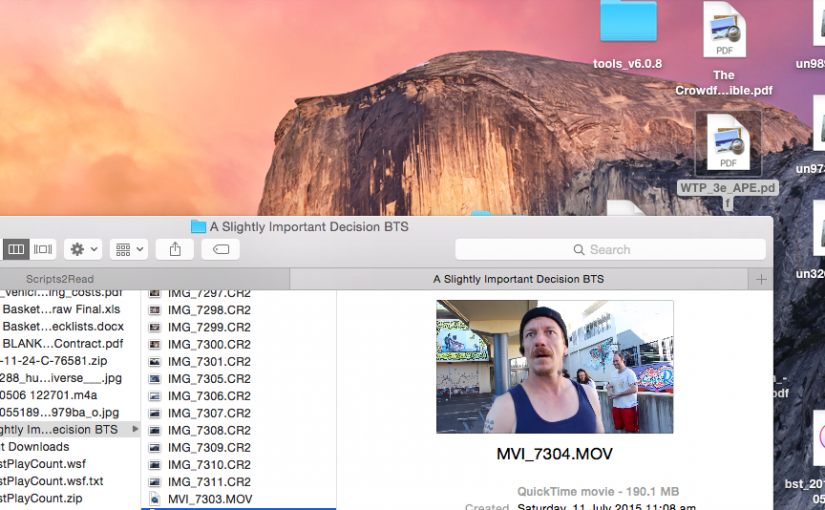
Firefox on Mac OS X does not clean up temporary files in the same way as the Windows version. When you right-click a PDF file and view it (instead of save) Firefox downloads it and then runs the browser helper application. Firefox has no way of knowing when you?ve finished with the file, so by design it does not delete it.
This can leave your desktop cluttered with PDF files and other assorted detritus of the web.
The location for saving temporary files from the Open with command is set by your Safari preferences on the General tab. Change Save downloaded files to? and pick something like Documents | Downloads | Temp. Firefox will now download files there with you chose Open with instead of Save. Your default Save location is still set in Firefox preferences.
Thunderbird also displays this behaviour.
The fix is
- Go the the URL about:config (type it in the address line of Firefox)
- Right/Control-click anywhere on the page and select New > Boolean from the context menu
- Type or paste
browser.helperApps.deleteTempFileOnExitas the preference name in the dialog box that pops up and select True for the value
Firefox will now automatically delete these Temp files when it exits.
For Thunderbird get to the config editor via Thunderbird > Preferences? > General > Config Editor? and add the same Boolean preference.
Update: 21 August 2015 (!) Although I wrote this 8 years ago it still gets traffic and is still an issue for many people. Say thanks below if it helped. A lot of the internet links to this post broke over the last few months, but I’ve fixed it now.
Update: 4 September 2015 Railroad adds that this is still an issue with OS X 10.8.5 through to 10.10.5. Thanks for the update.


16 responses to “PDF files left by Firefox on Mac OS X Desktop”
Thanks, this was very helpful. My wife’s mac is cluttered with a neverending pile of garbage from firefox. This might just take care of it.
You’re welcome. Thanks for the note.
That was very helpful, just what I was looking for… and other sites didn’t seem to have a fix that actually worked. This is probably obvious, but note that you’ll still see the files on your desktop temporarily, even if you exit the PDF viewer — it’s not until Firefox exits that they get deleted. Thanks so much.
@Matt yes the files stick around until you close Firefox. That’s why I recommend setting a temporary directory so they don’t clutter the desktop. Actually that’s how it’s designed, because Firefox has no way of knowing when you’re finished with the file so it keeps it until you close firefox, then it clears the temporary directory.
I followed your instructions for changing the “Save downloaded files to:” in Safari, but it hasn’t made a difference in where either Firefox or Thunderbird save the temporary files. You advice on adding the config entry for deleteTempFileOnExit works great, however. And since the Mozilla apps seem to prevent name collision, I shouldn’t have to worry about it deleting something I want to keep. So at this point, it’s gone from a major hassle to a minor annoyance.
THANKS!
Firefox does know whether you chose to open the file or to save it to disk. On systems other than OS X, if you open a downloaded file instead of saving it, it puts the file in a temporary folder. The contents of that folder get deleted on reboot.
I looked at the Firefox source code, and some cretin thought we Mac users wanted it to work differently than it does on Windows and Linux. He was wrong.
All it would take to fix this is to delete about 50 lines of special source code written just to break the Mac. I tried to do that on my own machine, but I couldn’t figure out how to rebuild FF.
Actually it should be a simple about:config variable that says where it gets saved, so you can put it in a different temporary folder for each user.
This complaint has been around for years, and Mozilla still hasn’t fixed it.
BTW, getting it to download to a download folder instead of the Desktop is a simple Preferences setting. The issue is to get Open With to use a different folder than Save.
Not sure why Michael thinks that someone is trying to break the MAC, because I use WinXP and I had exactly the same problem, except that my files would pile up unknowingly to me in the Temp folder, which is even worse.
Tip of my hat for your tip sir.
Good idea, but it also annoys me that the files persist until I quit Firefox, which is once a fortnight or so?
Another option which can work in tandem with (the about:config part of) this hint is to install the automatic save folder addon, and tell it to save all pdf files to a temporary directory. ~/Library/Caches/TemporaryItems/ is good, as it will be deleted every time you restart.
The only problem with this hint (and the original hint), is that if you don’t restart often and don’t quit Firefox often, you can get a buildup of files at this location. Perhaps one could write a script to delete files in here that aren’t open, but that seems like too much work for me!
Use firefox all the time with my Mac.. thanks for posting the article
Yes that’s a problem in Mac OS X while in the Windows operating systems it’s easy to auto delete temporary files. Nice post. Thanks for sharing with us.
Thanks to everyone for your additional tips and comments. This is one of the most popular posts on this blog. Even spammers prefer it to all the other content.
I don’t have a mac at the moment (but my high school aged daughter does.) Since I’ve moved all my email to the cloud I not longer use a local mail client.
I’ve moved back to a mac for several years now, but still work mainly in the cloud. So I don’t download pdf’s locally any more.
Thank you!
Thanks for that post, just what I needed?
Hi Zagz,
Neat Post, PDF files, otherwise known as Portable Document Format files, are popularly used nowadays. With industries piquing everywhere, you would find all sorts of PDF for brochures, forms, magazines, reports, and other materials that contain designs that would be too complicated when other kinds of files are used. Because of these PDF files, online reading has also become interactive on its own. This is a huge benefit we all can enjoy with these files.
BTW great blogpost
Still works, Mac OS 10.8.5 thru’ 10.10.5. Fyi, until we discovered your well-hidden post, we tried every methodology to prevent this annoying feature of Firefox — automatically saving a copy of a .pdf to the Mac desktops.
Received a lot of complaints from clients over just this seemingly minor annoyance and inconvenience.
Additional note, we’ve stopped donating to Firefox because of its annoying “mainstream” browser features over recent years. We’ve also been receiving a large number of complaints about these, ahhh, “ehancements” (?). However, it’s 50-50 between Chrome and Firefox (probably more like 80% v. 20% Google v. Firefox with Firefox’s annoying, counter-productive changes).
Your feedback has made Firefox more livable, far more productive and efficient with just this seemingly insignificant annoying Firefox “bug.”
Again, thanks for the suggestions and, ESPECIALLY, thanks for very professional, invaluable trait of maintaining this site, keeping this post current, etc (“communications” — a lost art!).
Thanks @Railroad for letting me know it’s still an issue. I’ll update the post with the info that it still applies to 10.10.5
While I don’t like the code-bloat that Firefox became, it has gotten better over the last couple of years. Enough that I’m considering making it my default browser again, just to stop the GooglePlex knowing everything about me.